Customer guide.
Ordering, paying, tracking your order: everything you can do on the site, step by step.
Contents
Getting started
Creating your account and signing in
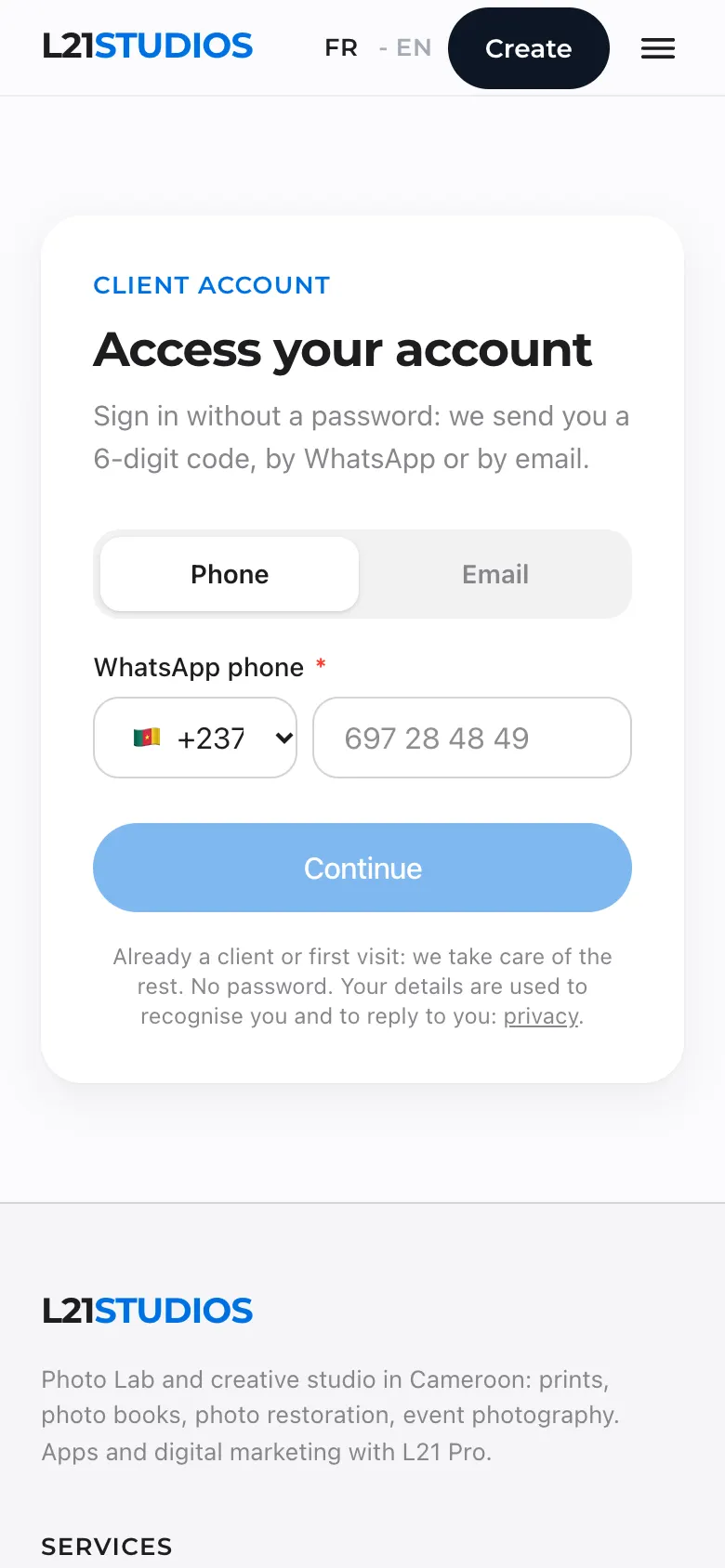
To order, book or restore a photo, you need an account. There is no password: each time you sign in, you receive a 6-digit code.
To book, or to order a design you tried from Create, you do not need to sign in first: you fill everything in, and at the end the site asks for your WhatsApp number and your email. You choose where to receive the code; this code creates your account (or finds the one you already have) and saves your request.
- Tap My account: at the top of the site on a computer, at the very top of the menu on a phone. Or tap the button on a page (“Order my prints”, “Create my book”, “Restore a photo”): the site will ask you.
- Choose Phone or Email, enter your number (with its country code, +237 for Cameroon) or your address, then tap Continue.
- First visit: the site asks for your title, first name, last name, phone and email, then Get my code.
- Type in the code you received (it expires after 10 minutes). You are signed in.
How does the code arrive?
By WhatsApp for numbers in Central Africa and the diaspora (France, Belgium, Switzerland, the UK, Germany, North America). For other countries, or if WhatsApp does not respond, it arrives by email: check your spam folder.
An advisor code?
If someone recommended L21STUDIOS to you, enter their code when you create your account (“advisor code” field) and tick the consent box. You get the benefit of their code on your first print order.
Your session closes by itself after 12 hours without use. In My account › Settings, Sign out of all devices closes your account everywhere (lost phone, shared computer).
Ordering
Printing your photos
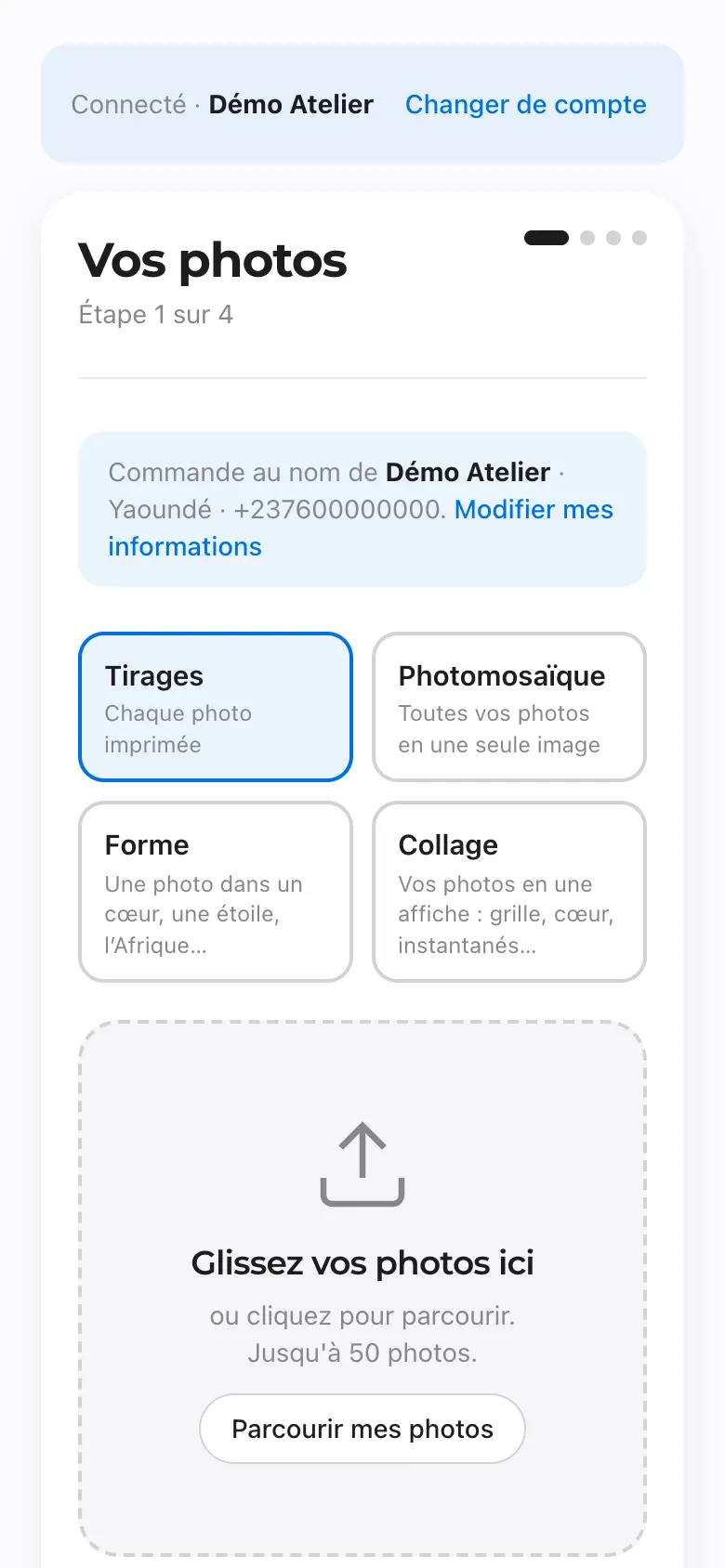
The print workshop opens with the Create button at the top of the site, or from the Photo Lab page. It takes four steps, on a phone or a computer.
The workshop is in French for now
The steps below give the French button names, with their meaning.
- Vos photos (your photos): choose Tirages (each photo printed), then Parcourir mes photos (browse my photos). Up to 100 photos per order. iPhone photos are converted automatically: keep the page open while they are prepared.
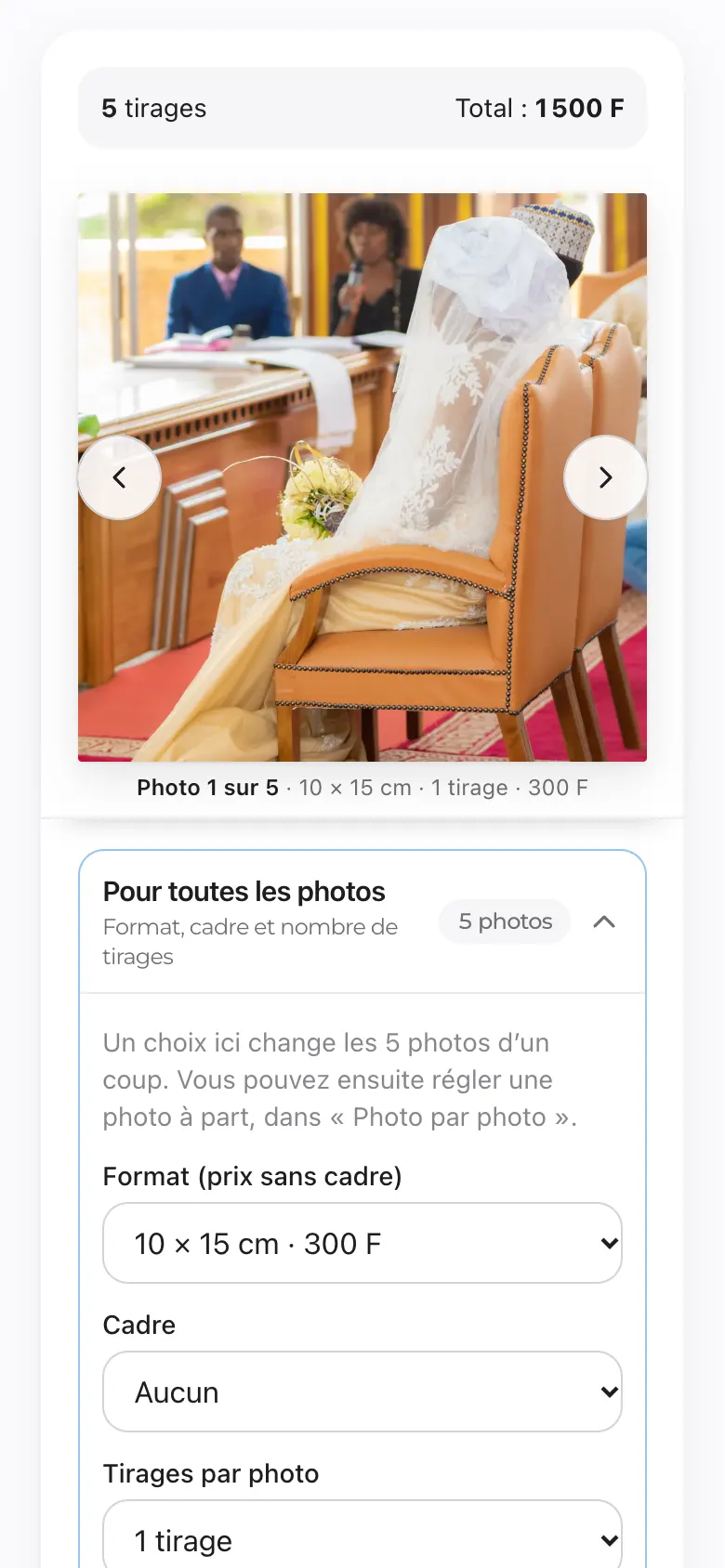
- Format & cadres (size and frames): set all photos at once (size, frame, number of prints), then, if needed, photo by photo. The total shows at the top.
- Livraison (delivery): Retrait au studio (collection at the studio, free) or Livraison à Yaoundé (delivery in Yaoundé), with your neighbourhood and a landmark.
- Paiement (payment): check the summary (each “Modifier” takes you back to that step), choose Orange Money or MTN MoMo, then Payer (pay). See “Paying by Mobile Money”.
- Your cart follows you: it is saved to your account. If a photo shows the “À ré-ajouter” (add again) badge, choose it again.
- Timing: printing takes one to two working days; delivery in Yaoundé, 24 to 48 hours.
- Once printing has started, the order can no longer be cancelled. Prices (print only, no frame) are on the Prices page.
Heart, shape, collage, mosaic
In the workshop, at the Vos photos step, three other choices turn your photos into a single creation to print and frame:
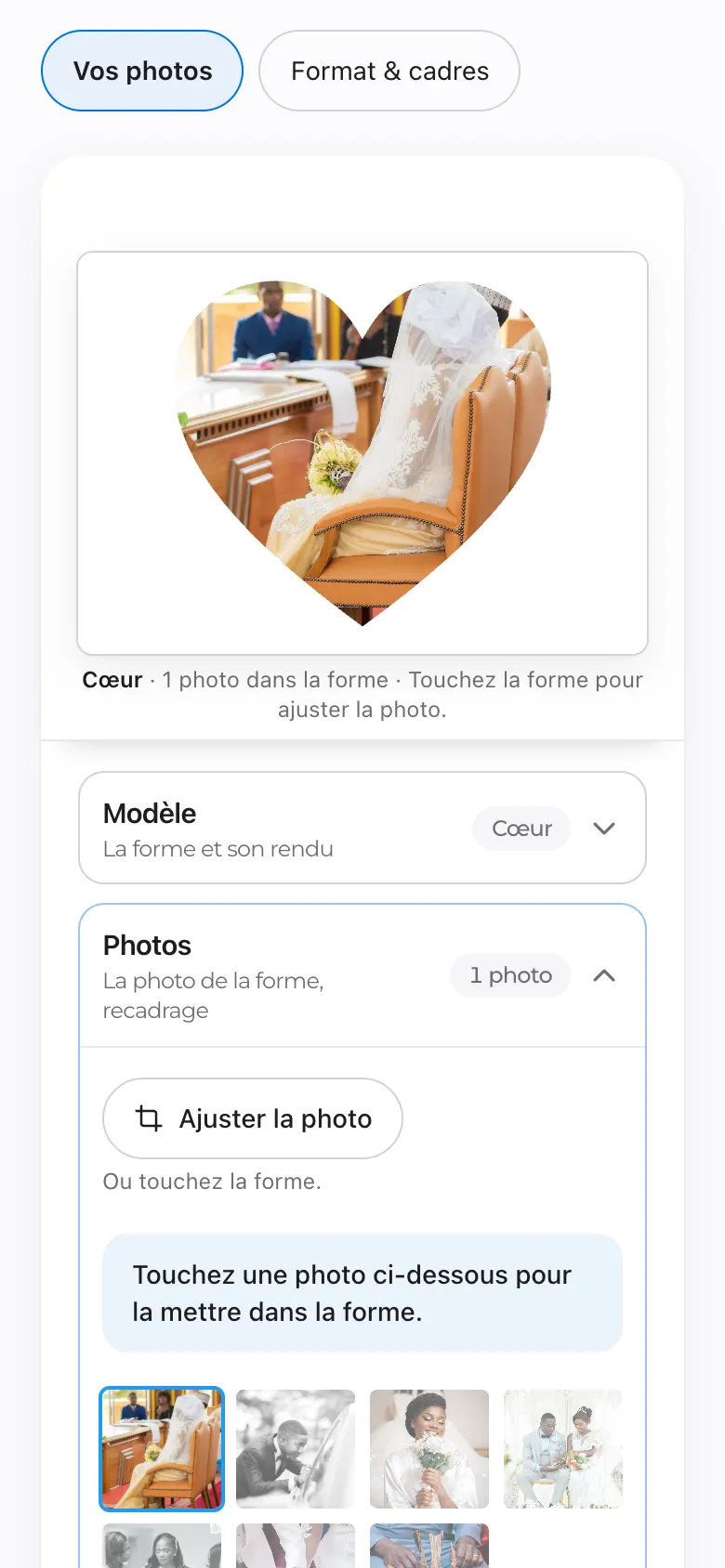
- Forme (shape): one photo, or several small ones, inside a heart, a star, Africa, Cameroon, wedding rings…
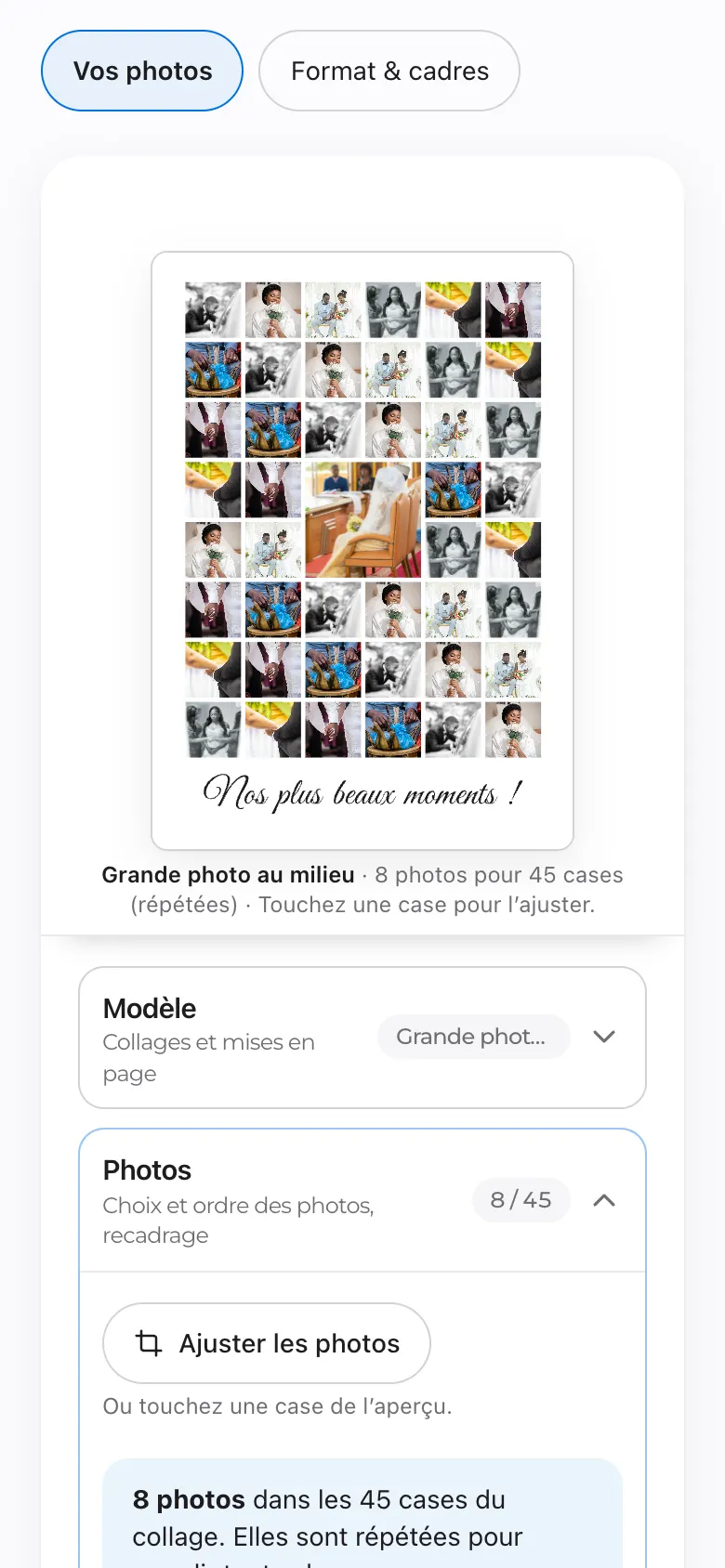
- Collage: your photos as a poster (grids, a large photo in the middle, hearts, instant photos), with a title if you like. For a large print (50 × 70 cm and more), the Grands formats group offers collages of 70 to 100 photos.
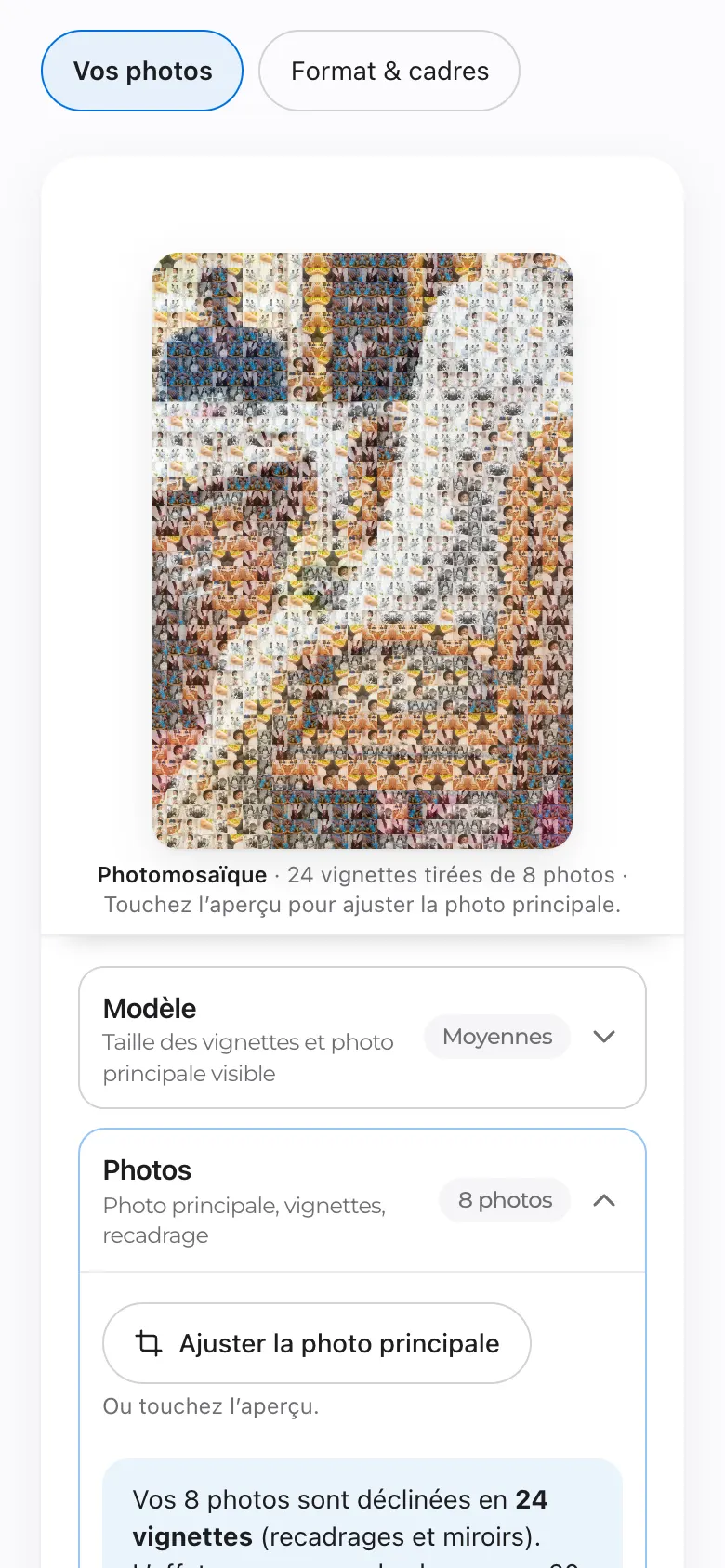
- Photomosaïque (photo mosaic): one large photo made of all the others. It looks best with 20 photos or more.
Choose the layout, tap a cell in the preview to change its photo or crop it, add a text, then the size and frame. The price is that of the size and frame, with no extra charge.
Trying a design without an account
Tap Create at the top of the site, then a design (framed print, photo heart, photo mosaic, collage with a title, burst heart, instant photos): you try it straight away with your own photos, without an account. Your photos stay on your phone, and the preview carries the “Preview L21STUDIOS” mark. Tap Order, choose the delivery, give your details, your WhatsApp number and your email, then enter the code you receive (on WhatsApp or by email, as you chose): your creation is waiting for you in the workshop, ready for payment, and all the other options open up.
Finish your creation before leaving the page
A shape, collage or mosaic in progress is not kept if you leave the workshop. Your photos stay in the cart.
Creating a photo book
The book editor is in French for now
The steps below give the French button names, with their meaning.
- On the Photo book page, tap Create my book. Choose the size (square 20 × 20, landscape 28 × 21 or landscape XL 39 × 29), the occasion and a title (you can change it later).
- In the editor, Photos tab: add your photos, those of your L21 galleries, or your loved ones’ photos (a link and a QR code to send them, valid for 14 days).
- Montage automatique (automatic layout) places the photos for you; then change a page with Mises en page (layouts), the mood with Style, and add your words with Texte (text). Pages are added two at a time (24 to 80 pages).
- Aperçu (preview) shows the whole book; PDF gratuit (free PDF) gives you a copy to check (with a watermark).
- Tap Commander (order), read the check, choose collection or delivery, tick “J’ai relu mon livre” (I have checked my book), then pay.
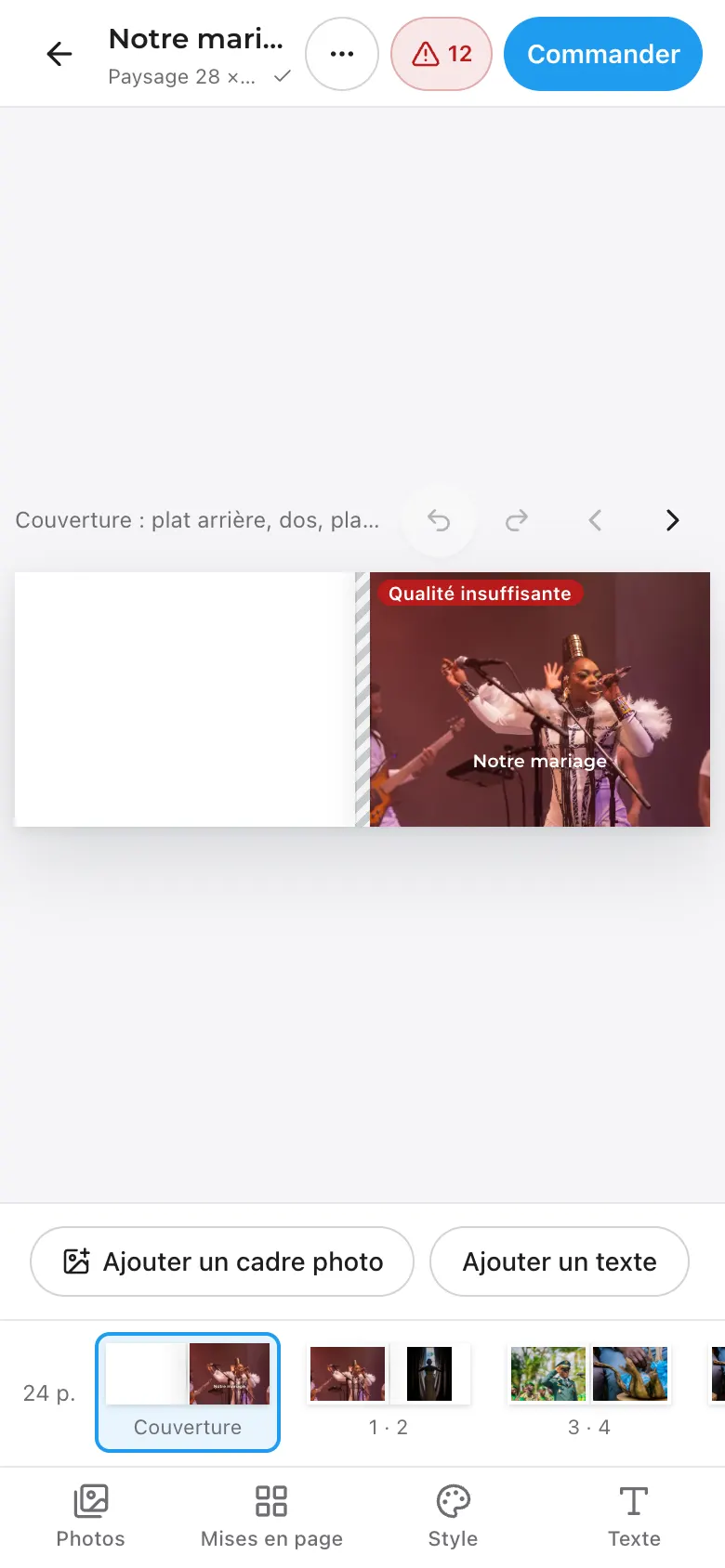
- Everything saves by itself, a moment after each change. Offline, your work is kept on your device and syncs when the network returns. Your book in progress is in My account › My photo books.
- Quality: a photo too small for its space is flagged. Blocking issues must be fixed before ordering.
- Montage par L21STUDIOS (layout by L21STUDIOS): when ordering, this option hands the layout over to our team.
- Available space: your photos on hold (books not ordered yet, unpaid baskets) are limited to 3 GB, about 850 photos. Beyond that, order a book or remove a draft to add more. What you have ordered does not count.
Check before paying
The book is printed exactly as it appears in the preview and cannot be changed once paid. Until it is paid, Annuler la commande et modifier le livre (cancel the order and edit the book) makes it editable again.
Restoring an old photo
- On the Restoration page, tap Choose a photo: one at a time, JPEG, PNG, WebP or HEIC, up to 40 MB. For a paper photo, follow the tip on how to photograph it well.
- Your first try is free (once per person). The result arrives in one to two minutes, as a preview marked “L21STUDIOS”. Slide the circle to compare before and after.
- You like the result: buy the high-definition photo (price on the button). You can then download it in high definition, or have it printed.
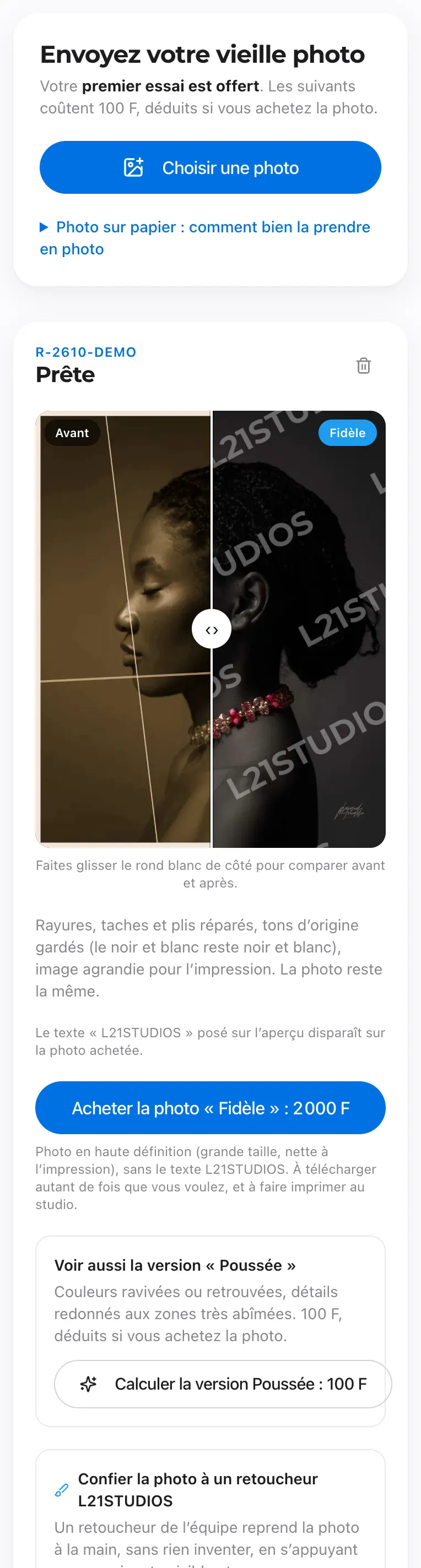
- Further tries: 100 F, deducted if you buy the photo. They produce two versions: Faithful and Enhanced (revived colours, sharper details).
- Retouching by a retoucher: for a badly damaged photo, our team reworks it by hand, within 72 working hours.
- After a technical failure, two retries are free. Your photos are in My account › My restorations.
Booking a photographer, requesting a quote
Wedding, traditional marriage, christening, studio session, corporate event, and also apps or communication (L21 Pro): everything starts from the Book a date button. No online payment at this stage.
- Without an account: your title, first name and last name (already a client: tap Sign in, nothing to type again).
- Choose the type of event, then the number of days and the moments to cover (dowry, town hall, church, party…).
- For each moment: date, time and place. A studio session is booked in a time slot (8 am, 12 pm, 4 pm or 8 pm).
- Tick the services you want: photo, video, drone, album, prints…
- Describe your project, give a budget if you wish, and how to contact you. Already signed in, tap Send my request.
- Without an account: give your WhatsApp number and your email, choose where to receive the code, then Get my code on WhatsApp (or by email). The code confirms your account and saves your request.
- Your request is kept as a draft on your device: you can come back to it later.
- You get a reference (RES-…). Our team replies within 24 working hours, with a quote you will find in My account › My quotes (PDF to download).
- The quote is accepted in writing (email or WhatsApp) with the deposit payment: this secures your date. It is valid for 30 days.
- When the quote provides for it, pay the deposit online from the link sent with the quote (or My account › My quotes): Pay the deposit, by Orange Money or MTN MoMo. The button shows the exact amount, fees included if the quote provides for it. Paying means you accept the quote; your receipt arrives in My invoices.
Deposit and postponement
The deposit is non-refundable. A date can still be moved if you ask more than 3 months before the event (see the terms and conditions).
Paying
Paying by Mobile Money
Site orders are paid by Orange Money or MTN MoMo, on the secure payment page of our provider NotchPay.
- Tap Pay: your photos are uploaded, then the NotchPay page opens.
- Choose your operator, enter your Mobile Money number and approve the request on your phone.
- You come back to the site: “Payment received, thank you!”. A confirmation email follows; it is your receipt.
- Payment being confirmedWait: the site checks with the operator every 5 seconds. Or tap “Check now”.
- The payment did not go throughNothing was taken. Your order is kept: “Try the payment again”.
- Your order is waiting for paymentYou left the NotchPay page: tap “Pay” to resume, from the workshop or My account.
No double payment
If a payment is already in progress, the site resumes it instead of opening a second one. If in doubt, check your order in My account before paying again. A duplicate payment is refunded.
The minimum amount payable online is 100 F.
Promotions and advisor codes
During a promotion, the usual price is crossed out, the discount percentage is shown next to it, and the new price is in red. The period and the conditions (items concerned, minimum amount) are written on the site.
- In the workshop, a message tells you how much is left to add to get the discount, then the amount deducted.
- Small sizes, frames, delivery and fees are usually not discounted: the details are shown.
- Advisor code: its benefit (free delivery or a discount on your first prints) is not added to a promotion. The site applies the larger of the two.
After your order
Tracking your order
Your orders are in My account: My prints, My photo books, My restorations. You also receive an email at each important step.
- Awaiting paymentThe order is saved, not paid yet.
- PaidPayment received: the team will check your photos.
- Being checkedThe team checks your files before printing.
- PrintingYour prints are being printed (email).
- ReadyReady to collect or on its way: an email (sometimes a WhatsApp) invites you to arrange collection or delivery.
- DeliveredOrder handed over. Thank you!
- CancelledThe order will not go ahead.
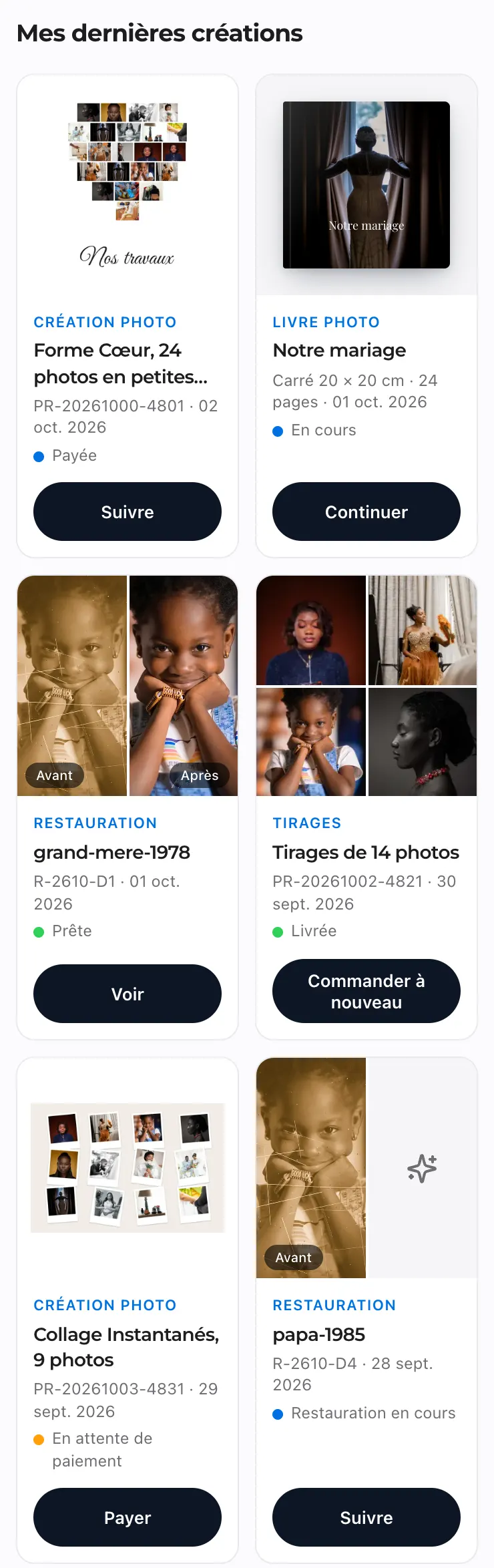
An unpaid order
In My prints, you can Pay, Edit it (size, frame, quantity, delivery: it is redone at today’s price) or Cancel the order.
Ordering the same photos again
Order again creates a new order with the same photos, to be paid.
A photo book
Its steps: Paid, Layout by L21STUDIOS (if you chose it), In production, Ready, Delivered. An email tells you at each step.
Collection or delivery
- Collection at the studio, in Yaoundé: when the order is ready, the email has a button to arrange the collection time on WhatsApp. The exact address is given to you then.
- Delivery in Yaoundé: within 24 to 48 hours after “Ready”, to the address and landmark given with the order.
Check your prints when you receive them
A print damaged on delivery is reprinted free of charge: send us a photo of the damage within 48 hours. For a book, a manufacturing defect is reported with a photo within 7 days.
Your client account
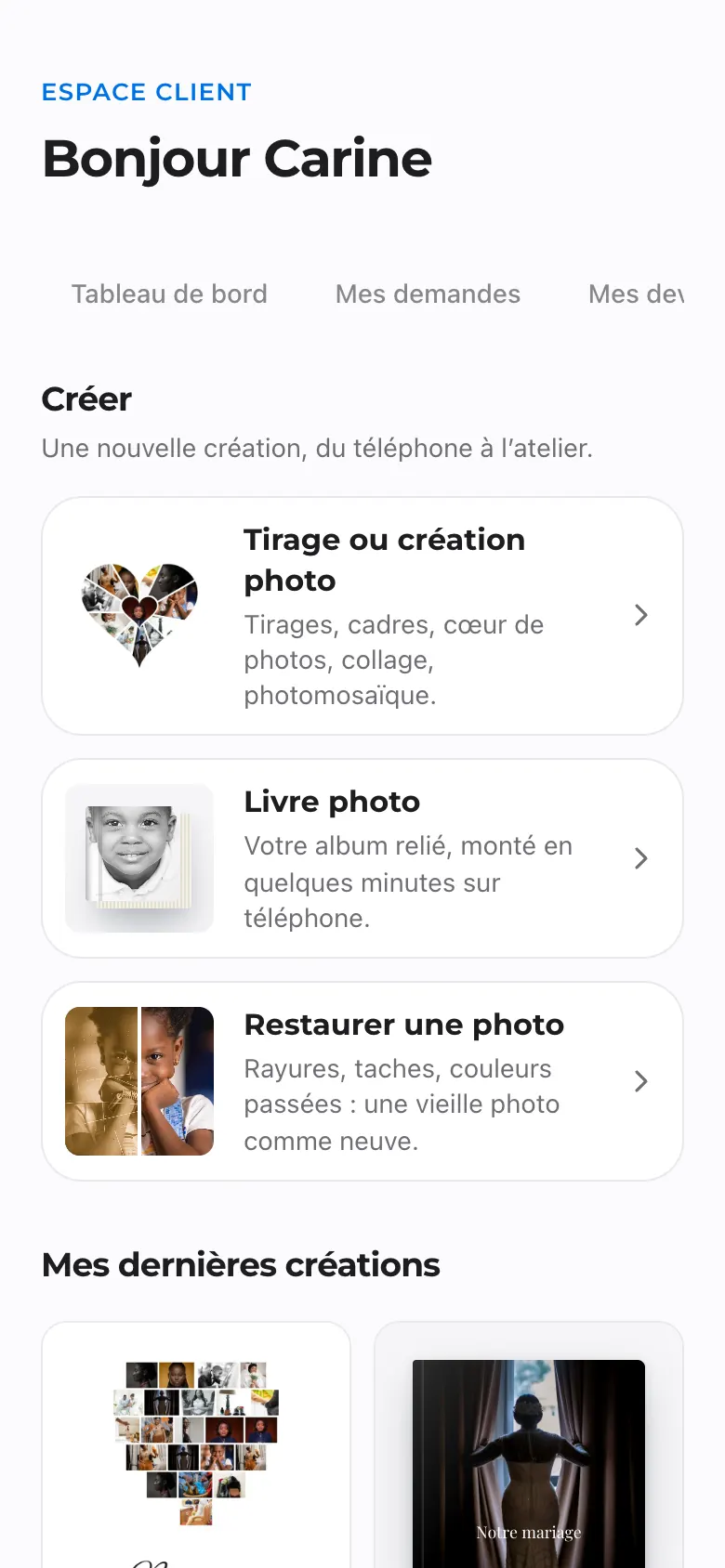
- My requestsYour booking requests and their status.
- My quotesThe studio’s quotes, as PDFs.
- My invoicesInvoices and receipts issued by the studio for your services.
- My printsYour print and creation orders.
- My photo booksYour books in progress and your orders.
- My restorationsYour restored photos.
- My galleriesThe photos of your event, to view and download.
- HelpYour questions to the studio and the answers.
- SettingsYour details, the language of our messages and signing out.
In Settings, you can change your name, email and city, and choose the language of our emails and messages (French or English). Your phone number is your sign-in identifier: to change it, write to us.
How long do we keep your photos?
We keep your photos for the time needed to make your order, follow it up and let you order it again. After that, they are removed from our servers: they are your photos, and we do not keep them longer than useful.
- Prints: 24 months after handover, so that you can order them again.
- Photo mosaic, shape, collage: your photos 6 months, the finished creation 24 months.
- Photo book: your photos 6 months, the print file of the book 24 months. A book never ordered: 12 months after your last change.
- Restoration: the photo you sent 6 months after your last visit, the version bought in high definition 24 months.
- Order never paid: 3 months.
Unless stated otherwise, periods start when the order is handed over. An order in progress keeps all its photos. Your order, its invoice and its thumbnail always remain in your history.
Before anything is removed, you are told by email one month before (and one week before for a book). In My account, under the order, you will find the date and two buttons:
- Download my photos: all the photos of the order in a single file (ZIP archive).
- Keep them 12 more months: free, and renewable when the date gets close.
At the end of the period, the photos still spend 30 days in a bin: write to us during that time and we can put them back.
Keep your originals
L21STUDIOS is not a backup service. Always keep a copy of your photos, on your phone and somewhere else (a computer, a drive, an online service).
A question or a problem?
- In My account › Help, open a new help request. From an order, the “A problem with this order?” link attaches it directly.
- Choose the subject, give a title, describe the situation, then send.
- The answer usually arrives the same day, in your account and by email. Reply in the same thread; once it is sorted, tap It’s sorted, thank you.
You can also write to us from the Contact page, or on WhatsApp at +237 6 97 28 48 49, Monday to Saturday, 9 am to 7 pm. A complaint is made within 7 days of delivery; we reply within 5 working days.
Staying safe
- Never give your sign-in code to anyone: L21STUDIOS will never ask for it, by phone or WhatsApp.
- Your Mobile Money PIN is only typed on your phone, to approve a payment you started yourself from our site.
- Our official WhatsApp number is +237 6 97 28 48 49.
- Nobody should create your account for you, not even the person who recommended the studio.
Names, numbers and amounts shown in the screenshots are examples.